
Employee overview
As part of the preparatory payroll process, a quick overview of the incurred labor costs at each location is essential for a straightforward and timely payroll run.
Therefore, the employee overview displays all employees of a location, along with payroll-relevant details, clearly arranged in a table.
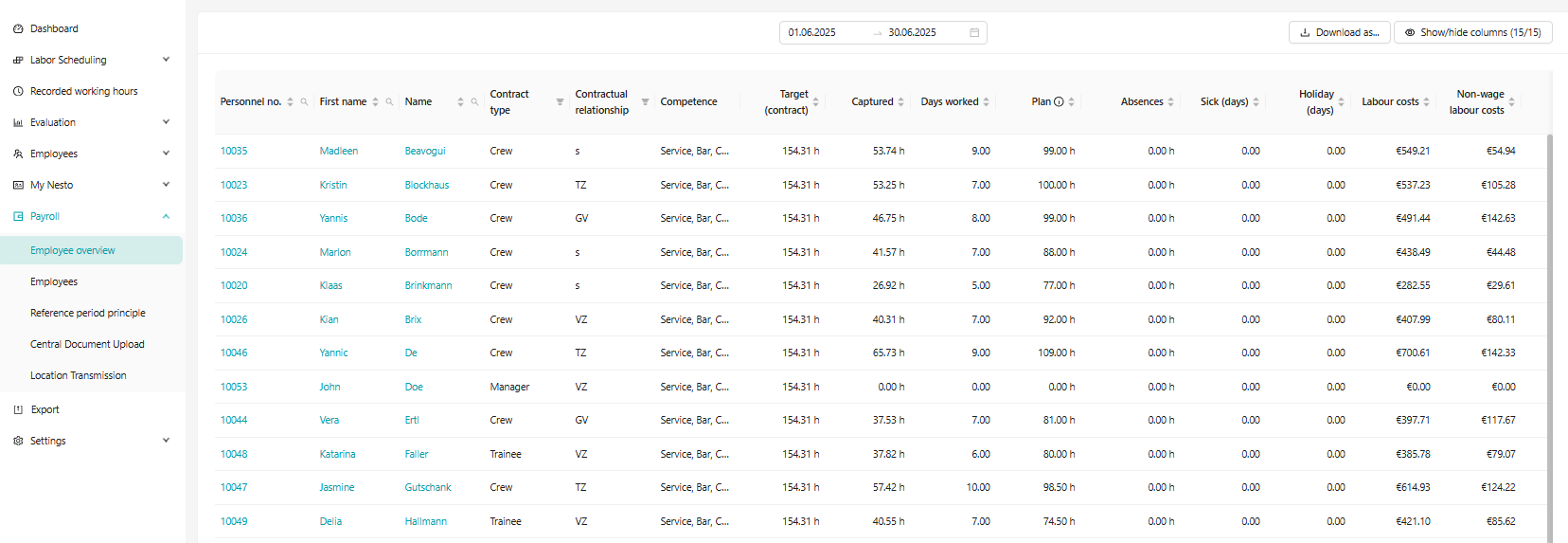
The employee overview includes important contract details, the qualifications of the employees, the recorded working times, still planned hours, as well as compensated absences:
Employee type: This column lists the employee type according to the employment contract stored in Nesto (Crew, Trainee, Manager, etc.)
Contract type: This column shows the contract type valid for the selected month according to the employment contract (full-time, part-time, marginally employed, student assistant)
Qualification: All qualifications of the employees are listed here. If the list is too long to display directly on the page, additional qualifications become visible by hovering the mouse over the field.
Target (Contract): This shows the contractual hours for the respective month. If weekly contractual hours are used, they are converted into monthly contractual hours.
Recorded: This column includes all working hours recorded so far according to the time tracking system.
Plan: This column shows the planned working hours for this month. It is important to note that this reflects the current status of planned shifts, regardless of whether the duty roster has been published or not.
Absences: This column summarizes all compensated hours of absences.
Sick (days): This shows the number of compensated sick leave days.
Vacation (days): This shows the number of compensated vacation days accordingly.
Total: Depending on the month displayed in the employee overview, the following values are shown in this column:
Previous month: total number of recorded hours (+ compensated absences)
Current month: calculation of recorded and planned hours, with recorded days up to yesterday (+ compensated absences)
Next month: exclusively the planned hours (+ compensated absences)
Difference: This column shows the difference between target and actual hours.
Additional features:
For all columns except Employee type, Contract type, and Qualification, alphabetical sorting is possible. The columns Employee type and Contract type have filter options.
Additionally, it is possible to select the Personnel number, first name, or last name by clicking, to be directly redirected to the employee details. This enables direct access to the details of the respective employee.
A date range filter is also available to examine specific periods separately.
The applied filters remain active throughout the entire session.
By using the function to show or hide columns, a custom table can be created and then exported as PDF or Excel via the "Download as ..." function.