
Wage configuration
What is the purpose of the wage configuration in Nesto?
The payroll department prepares salary and wage statements and calculates the monthly payments to employees. Nesto provides the movement data – such as working hours, absences, surcharges, and special payments – via export for the payroll office. To ensure this export can be directly imported into the payroll software used (e.g., DATEV LODAS), a precise wage configuration is required.
How do I obtain information about the necessary wage types?
You receive the relevant information from your tax or payroll office.
What configuration options are available?
The wage configuration defines rules and parameters for how wages and salaries are processed. Possible settings include (depending on the payroll software):
Calculation methods: hourly wages, overtime
Surcharges: SFN surcharges (Sunday, holiday, and night surcharges), overtime surcharges
Output units: movement data in hours, days, euros, or unspecified
Company-specific rules: benefits in kind, special payments
Booking/failure keys: keys for the movement data
What should be considered?
Unneeded wage types: If a wage type should not be transmitted via Nesto, it must not be stored in the configuration.
Example: Salaries are often maintained directly in the payroll software and do not require a separate wage type in Nesto.Conditions: Different parameters may require different wage types, e.g.:
Surcharge amount (x%)
Contract types (full-time, part-time, marginally employed, student assistant)
Employee types (manager, crew, trainee, apprentice)
Compensation types (wage or salary recipients)
How does the payroll process work?
Preparatory payroll in Nesto:
Nesto collects and organizes the relevant data for payroll, e.g.:Working hours
Absences
Values for time off in lieu (e.g., hourly value per absence day)
Goal: efficient and error-free creation of the final payroll.
Payroll in the payroll system:
The payroll office or tax advisor imports the movement data file into the payroll software and creates the final statements.
Information and Templates for Download
ℹ️ Informationen für das Lohnbüro.pdf
Agenda: Agenda Lohnkonfiguration.xlsx
Addison: Addison Lohnkonfiguration.xlsx
Datev LuG: Datev LuG Lohnkonfiguration.xlsx
Datev Lodas: Datev Lodas Lohnkonfiguration.xlsx
Edlohn and ScopeVisio: Edlohn u. ScopeVisio Lohnkonfiguration.xlsx
Instructions for Completing the Wage Configuration
1. General Information:

Name of the person responsible: Name of the person who creates and/or manages the wage interface. Example: Max Mustermann
Company name: Name of the company for which the payroll is carried out. Example: Mustermann GmbH
2. Organizational Data:

Organisationseinheit (organization unit): Department or area of the company.
Example: AdministrationMandantennummer (client number): Unique number for this client.
Example: 12345 (depending on the payroll software)Beraternummer (advisor number): Number of the tax advisor.
Example: 22042 (depending on the payroll software)Kostenstelle (cost center): Number for precise cost allocation.
Example: Administration 1100
3. Movement Data and Salary Components:
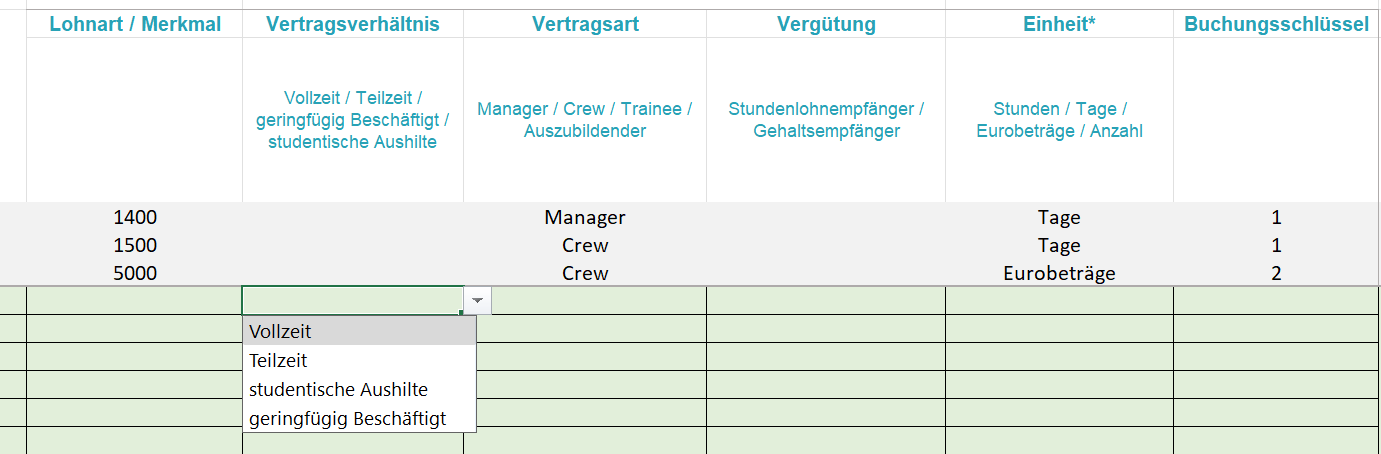
Wage types: Numbers for the various wage components (e.g., vacation, surcharges).
Example: Vacation 1200, holiday surcharge 2002
4. Additional Information / Conditions:
Vertragsverhältnis (contract type): Type of employment (only enter if there are differences in wage types).
Example: Full-timeVertragsart (employee type): Differentiation by position (only specify if relevant).
Example: Manager vacation 2000, crew vacation 2001Unit: Unit in which the data is calculated.
Example: daysDepending on the payroll software:
Booking key: For more precise specification of the booking.
Example: 1 for vacation daysFailure key: Codes for recording absences.
Example: U for vacation
Additional Notes:
Mandatory fields: Fill in client number, advisor number, and cost centers.
Comments: Surcharge values that differ between wage types can be added under comments.
Example: 15% for wage type 2700 and 25% for wage type 3000Data validation: Please check completeness and plausibility before transmission.